 Vocami
How Vocami works
Vocami teaches English words, phrases and sayings with flashcards. Each day you learn a few new cards in Lessons and go over the ones you've learned in Reviews. A few minutes a day is enough.
Your day
- Open your Dashboard to see what's waiting.
- Do your Reviews first: they keep what you've already learned.
- Then learn some new cards in Lessons.
Lessons
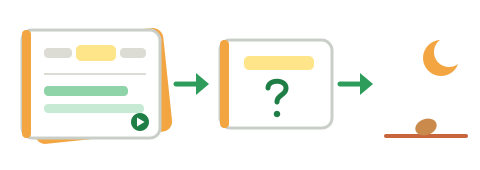
A lesson teaches a few new cards at a time. Each card has an example sentence with the term highlighted, what it means, and a translation in your language. Tap the play button to hear it.
- Got it: you've read the card. On to the next one.
- I already know this: the card is skipped and never comes up again.
Then comes a quick quiz on the cards you've just learned. If you forget one, it comes back at the end until you remember it. Your first review of them is tomorrow.
If you study more than one deck, choose one on the Lessons page.
Reviews
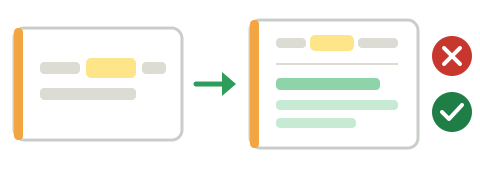
Reviews bring back the cards you've learned when they're due, from all your decks together.
- Read the sentence and think of what the highlighted term means. For a saying, think of what the whole saying means.
- Press Show answer to turn the card over.
- Be honest: Remembered if you knew it, Forgotten if you didn't.
On a keyboard, Space shows the answer, 1 is Forgotten and 2 is Remembered. Finish now stops at any time; the rest wait for next time.
How spaced repetition works
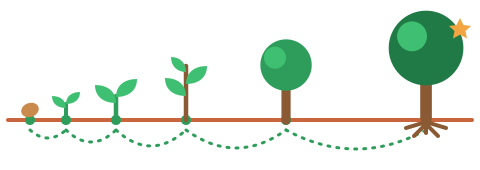
Each time you remember a card, it waits longer before it comes back. If you forget it, it comes back sooner. So your time goes on the cards you're about to forget, not the ones you know well.
Every card grows through these stages:
| Stage | Next review |
|---|---|
 Seed 1 | after 1 day |
| Seed 2 | after 2 days |
 Sprout 1 | after 1 week |
| Sprout 2 | after 2 weeks |
 Sapling | after 1 month |
 Tree | after 4 months |
 Rooted | never: you know it |
Remembered moves a card up one stage. Forgotten moves it down one stage, or two from Sprout 1 up.
Levels and decks
Each deck has levels of 100 cards. You pass a level when 90% of its cards reach Sprout 1. Levels don't lock: your daily limit for new words sets the pace.
On the Decks page you can browse and search every card, add a term to your next lesson, skip ahead to a later level, or pause a deck.
Settings
In Settings you can choose how many new words and reviews you do a day, how many cards come in each lesson, auto play for the audio, and the language of the app and of the translations. Going away? Turn on Holiday mode and nothing comes due until you're back.
Found a mistake?
Press Report a mistake with the translation under the card and we'll fix it. For anything else, use Contact us. There's more in the questions and answers.